
TL;DR — the picks
The value pick: BATLEXP G350 — from £94.90. The classic Amiga library runs at full speed on the G350’s RockChip RK3326 through the AmiBerry emulator on its replacement dArkOS firmware, tested on the device itself, with games set up to boot straight into play. It is the best-stocked device I sell, in stock across every colour.
The clamshell: Anbernic RG DS — from £144.90, with the Amiga configured and ready out of the box on its RockChip RK3568 chip, and its user guide documenting how every platform on the device is set up. One of the two devices I am actively stocking, alongside the G350 — though it is purpose-built for the Nintendo DS.
The metal dual-boot pick: Anbernic RG353M — £184.90, with the Amiga configured twice over: AmiBerry on the ArkOS boot, UAE4ARM on the Android one. An aluminium body and drift-resistant Hall Effect sticks, in a horizontal shape that suits the Amiga well. Down to two units, with no restock planned.
The vertical alternative: Anbernic RG353V — from £149.90. The same RK3566 dual-boot platform as the RG353M in a lightweight vertical pocket shape, on the same sharp 3.5″ 228 PPI 4:3 panel as the G350. Four single units remain — final stock.
Every device here is dispatched from the UK. Prices are correct on the day this was written.
Why the Amiga is a different proposition
The ZX Spectrum was the first home computer in this series. The Amiga is the second, and it is a generation on. Commodore launched it in 1985 as a serious machine with custom silicon for graphics and sound that nothing else in a home could touch; the A500 arrived in 1987 and turned it into a fixture of British gaming through the early 1990s. Where the Spectrum was tape hiss and rubber keys, the Amiga was smooth scrolling, sampled sound and games that arrived on floppy disks.
That history matters here for one reason: emulating a 16-bit computer with custom graphics chips is a step up in workload from an 8-bit one — but not a big enough step to worry any chip in the range. The classic Amiga library runs at full speed on every device in this article, tested on the humblest of them and scaling up from there. Power is not the decision. The decisions are the same two that shaped the Spectrum article — the shape of the picture, and the controls the games answer to — plus a third the Amiga adds on its own: how a game gets from standing start to playing.
The 4:3 picture — drawn for a television
Amiga games drew their picture for a 4:3 PAL television, so the 4:3 panels are their natural home. On the G350, the RG353V, the RG353M and the RG DS, the picture fills the display the way it filled the family TV, and on the 640×480 panels the emulation is configured to use that height in full.
On the 16:9 widescreen panels the same picture pillarboxes, with black bars at either side — the same reason widescreen was wrong for the Mega Drive and right for the PSP. The bars are not a fault, but a 4:3 panel is the better home for a machine that spent its life drawing for one.
A computer, not a console — the boot question
An Amiga was a computer first. Switch one on in 1990 and you were looking at the Workbench desktop, not a game — and a game spread across several floppy disks asked you to swap them, in order, while it loaded. That is how the machine worked, and a naive emulation of it reproduces every bit of that ceremony.
None of it survives on a configured handheld. On every device I sell, the Amiga games are set up to boot straight into play: no desktop, no disk swapping, no waiting for the drive to clatter. That setup is invisible on a spec sheet, and it is the difference between an Amiga library that feels like a museum piece and one that behaves like a games console — pick a game, press a button, play.
The input question — joystick, mouse, or both
The Amiga shipped with a two-button mouse as standard, and its games split by input. Most of the library answers to a digital joystick — the classic arcade-style control that maps cleanly onto a handheld’s d-pad and face buttons. A smaller share of the library, and some of the machine’s most fondly remembered work, was built around the mouse instead.
That split is the Amiga’s version of the input question the ZX Spectrum article covered, and it is where configuration earns its keep. The joystick is set as the default control on the devices here, matching how the era’s pad-playable games expect to be met — the right default for the overwhelming majority of the library. On the G350, the mouse-driven side is handled as well: its AmiBerry emulator is configured so the gamepad itself acts as the mouse in the games that want one, through a single setting that works across the whole library and is simply ignored by the joystick games, so nothing else changes. If a specific game is ever puzzling you on a different device, that is the sort of thing my UK support exists for — a question about a specific game is the kind I can give a specific answer to.
The picks in detail
The value pick — BATLEXP G350 (from £94.90, in stock)
The G350 is the cheapest device I sell and one of the two I am keeping in stock, and for the Amiga it needs no apology. Its RockChip RK3326 runs the classic Amiga library at full speed through the AmiBerry emulator on the replacement dArkOS firmware — and this is not a paper claim: it is the entry-level chip of the range, and the Amiga has been tested and configured on it directly. Games boot straight into play, the joystick is the default input — and in the mouse-driven games the gamepad itself does the mouse’s job, a setting that covers the whole library and leaves the joystick games untouched — and the picture fills the 3.5″ 4:3 panel — 640×480, 228 PPI, the sharpest 4:3 pixel density in the range. What the lower price buys out of is everything past the Amiga’s era: the RK3326 is a 2D-first chip, excellent through the Game Boy, the SNES and the Master System, good for the PS1, and honest about where it stops. For the classic Amiga library it is the equal of anything here — and it is the best-stocked device I sell.
- 3.5″ 4:3 IPS screen, 640×480, 228 PPI — the natural 4:3 home, edge to edge
- RockChip RK3326 — full-speed classic Amiga library through AmiBerry, tested and configured on dArkOS
- Replacement dArkOS firmware (Linux)
- See the BATLEXP G350
The clamshell — Anbernic RG DS (from £144.90, in stock)
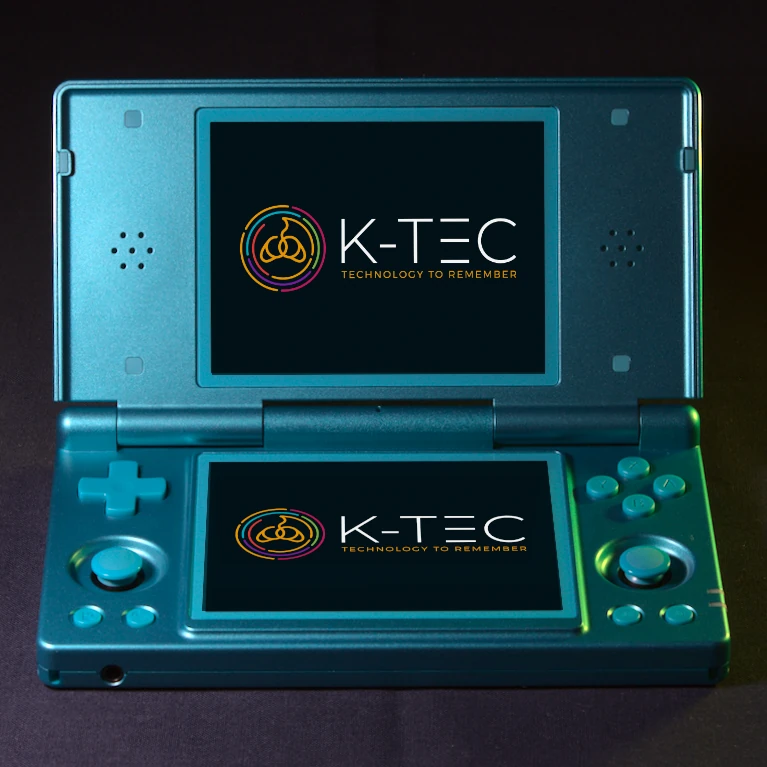
The RG DS carries the Amiga configured and ready out of the box on its RockChip RK3568 chip, shown on the 4.0″ 4:3 top screen, and its published user guide covers how every platform on the device is set up. It is one of the two devices I am keeping in stock — alongside the BATLEXP G350 — while the RG353V and RG353M run down their final units, and the clamshell form suits computer-era gaming well: it closes over its own screen and slips into a bag. The honest caveat is the one this series has given before: the RG DS exists for the Nintendo DS, and its second screen and touch hardware go unused by a 1980s computer. If dual-screen gaming is a draw alongside the Amiga, the RG DS does both well; if the Amiga is your only priority, the same money goes further elsewhere.
- 4.0″ 4:3 IPS top screen, 640×480, 200 PPI
- RockChip RK3568 — full-speed Amiga, configured out of the box
- Replacement GammaOS Next firmware with Daijishou frontend; clamshell, dual-screen, touch
- See the Anbernic RG DS
The metal dual-boot pick — Anbernic RG353M (£184.90, two units left)
If you want the Amiga configured on both sides of a dual-boot device, this is the pick. The RG353M ships ArkOS on Linux and GammaOS-RK3566 on Android, each with its own configured library — and on this platform the Amiga is set up on both: AmiBerry on the ArkOS boot, UAE4ARM on the Android one. Two emulators, two operating systems, one library that plays either way. The RockChip RK3566 beneath it runs the Amiga library at full speed, and the body is a substantial one: an aluminium shell, drift-resistant Hall Effect sticks, a horizontal gamepad shape that suits longer sessions — and suits the Amiga, a machine that lived on desks, well. It shares its 3.5″ 4:3 panel with the G350 and RG353V — 640×480, 228 PPI — and I should be straight that it is final stock: two units remain, and I am not restocking it.
- 3.5″ 4:3 IPS screen, 640×480, 228 PPI, multi-touch
- RockChip RK3566 — full-speed Amiga on both boots: AmiBerry (ArkOS) and UAE4ARM (GammaOS-RK3566)
- Dual-boot ArkOS + GammaOS-RK3566; aluminium body, Hall Effect sticks
- See the Anbernic RG353M
The vertical alternative — Anbernic RG353V (from £149.90, four single units)
The RG353V is the same RK3566 dual-boot platform as the RG353M — the same ArkOS and GammaOS-RK3566 setup, the same configured Amiga on both sides — in a lightweight vertical pocket shape, at a lower price. It shares the same 3.5″ 640×480 228 PPI 4:3 panel as the G350 and the RG353M: the sharp 4:3 home the Amiga’s picture wants, edge to edge. If you want the dual-boot platform without the metal body’s weight and price, this is it — with the same caveat as its sibling: final stock, four single units across the variations, no restock planned.
- 3.5″ 4:3 IPS screen, 640×480, 228 PPI, multi-touch
- RockChip RK3566 — the same dual-boot, dual-emulator Amiga setup as the RG353M
- Dual-boot ArkOS + GammaOS-RK3566; vertical pocket shape
- See the Anbernic RG353V
What about the widescreen devices?
The Amiga’s 4:3 picture cannot fill a 16:9 frame without stretching, so a widescreen device draws the usual black bars at either side — the same trade-off as the Mega Drive and Master System articles.
The PowKiddy RGB10 Max 2 (£159.90) lists the Commodore Amiga among its supported computer platforms and runs it at full speed on the same RockChip RK3326 chip as the G350 — the same tested performance, in fact. Its 5.0″ 16:9 panel is comfortable and its ergonomic grip is genuinely good, but a 4:3 picture puts that width to work on black bars. It is down to a single Ice Special Edition unit, and its RetroOZ firmware is its real strength rather than its fit for a 4:3 platform.
How to choose
- You want the Amiga back for as little as possible: G350. Full-speed classic Amiga library through AmiBerry on dArkOS at £94.90, on the sharp 228 PPI panel with the 4:3 fit — and the best-stocked device I sell.
- The Nintendo DS is a draw alongside the Amiga: RG DS. Amiga configured out of the box, dual-screen and touch for the DS, and one of the two devices I am keeping in stock.
- You want the Amiga on both boots, in the best-built body: RG353M. Aluminium, Hall Effect sticks, AmiBerry and UAE4ARM configured either way — but it is down to two units, so if it appeals, it is worth acting quickly.
- You want that dual-boot platform in a lighter, cheaper shape: RG353V. The same platform and panel in a vertical pocket body — final stock, four single units.
- You are drawn to the RGB10 Max 2: it runs the Amiga at full speed, but its 16:9 panel shows the usual side bars and it is down to a single unit — buy it for its grip and firmware, not for this platform.
Why a configured handheld plays the Amiga better than a factory one
Every device on this page runs a replacement firmware rather than the stock operating system it ships with — dArkOS on the G350, GammaOS Next on the RG DS, dual-boot ArkOS and GammaOS-RK3566 on the RG353V and RG353M, and RetroOZ on the RGB10 Max 2. On each of them the Amiga runs through mature, full-speed emulation — and on a home computer, that is where the work begins rather than ends. Games that boot straight into play instead of the Workbench desktop, a joystick mapped where the era’s games expect it, a picture configured to fill the panel: these are per-platform settings, and they are the difference between a library that loads and a library that plays. The SNES article covers the same story from a more familiar platform, and the full picture of what changes between a factory handheld and one of mine is on The K-TEC Difference. If you are weighing a pre-configured UK device against a marketplace import, I have put that comparison in one place: K-TEC compared with other suppliers. Every device ships from UK stock by Royal Mail Tracked 48, arriving in 2–3 working days, with UK-based support on the other end of the phone.
Beyond the software, each device has had the factory SD card removed and replaced with a brand-name card from SanDisk, Samsung or Kioxia, and every one is covered by my Lifetime SD Card Guarantee — if the card fails or its data corrupts, for the life of the device I replace the card or restore it. A failed card is the single most common way a retro handheld dies, and it takes your saves with it. I wrote about exactly why that happens, and how I remove the risk, in Why Do Retro Handheld SD Cards Keep Failing?
The short version
The classic Amiga library runs at full speed on every device I sell, from the £94.90 BATLEXP G350 upward — power is not the decision. The picture is 4:3, so the 4:3 panels are its natural home, and the real questions are the ones a home computer asks: how the games boot, and what they answer to. The G350 is the value pick and the best-stocked device I sell. The RG DS carries the Amiga out of the box and is one of two devices I am keeping in stock. The RG353M configures the Amiga on both boots in an aluminium body — two units left. The RG353V puts the same dual-boot platform in a vertical pocket shape — four single units. The RGB10 Max 2 runs it at full speed too but shows the usual side bars, down to a single unit. If you are unsure which fits you, contact me and I will point you at the right one.
Leave a Reply